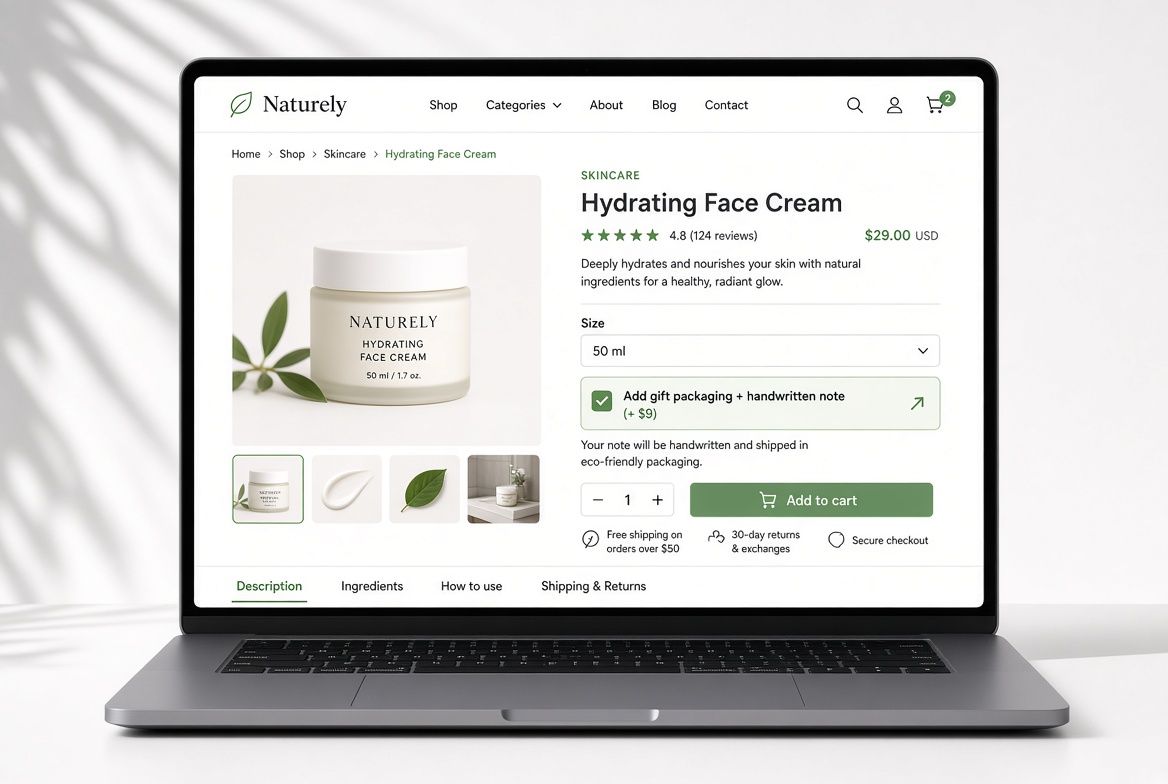
Most WooCommerce stores try to increase average order value the hard way.
They create new product variations.
They build complex bundles.
They run discounts that cut into margins.
They redesign the product page.
There’s a much simpler approach that many stores overlook — and it usually takes less than 10 minutes to set up.
Add one well-chosen paid option directly on the product page. Price it between $8 and $15. Make it feel like a natural upgrade instead of an upsell.
When done right, this single addition can quietly lift average order value on a meaningful percentage of orders, without requiring extra traffic or major changes to your catalog.
Why this works so well
By the time a customer reaches the Add to Cart button, they’ve already decided they want the product. The only remaining question is whether they leave with just the base item or something slightly better.
A low-friction option presented at that moment has three big advantages:
- It requires almost no extra decision-making (especially if it’s a simple checkbox).
- The price feels small relative to the main product.
- It often solves a real need the customer already has (gift packaging, protection, convenience, personalization).
Stores that test this type of micro-offer frequently see a noticeable bump in average order value. In many cases the increase lands in the 10–18% range, depending on the product and the offer.
What makes a good micro-offer
The best options share a few traits:
- Priced between $5 and $15 (ideally under 20% of the main product price)
- Easy to fulfill (low cost and low complexity)
- Clearly valuable to the customer
- Optional and non-intrusive
Here are proven examples across different store types:
Apparel & fashion
“Add gift packaging + handwritten note (+$8)”
Home goods & accessories
“Add protective case / dust bag (+$9)”
Coffee, food & consumables
“Add extra bag / specialty scoop (+$7)”
Print-on-demand & custom products
“Upgrade to premium packaging (+$10)”
Electronics & gadgets
“Add extended protection plan (+$12)”
Digital products & services
“Add priority processing or bonus guide (+$15)”
The key is relevance. The option should feel like a logical next step, not a random add-on.
How to set this up with Extra Product Options
You don’t need custom code or multiple plugins. With Extra Product Options you can create this kind of offer in a few minutes:
- Edit the product (or create a global form if you want the option across multiple products).
- Add a Checkbox or Radio Button element.
- Write a clear, benefit-focused label (for example: “Add gift packaging + handwritten note”).
- Set a fixed price.
- (Optional) Use conditional logic so the option only appears on relevant products.
- Save and test.
You can also make the option required under certain conditions, control its position on the page, or combine it with other fields if needed. Most stores start with a single simple checkbox and expand from there.
What results to expect
This is not a magic bullet that will double your revenue overnight. It is, however, one of the highest-leverage, lowest-effort changes you can make to a product page.
Because the customer is already committed to buying, even a modest take-rate (the percentage of customers who select the option) can produce a meaningful increase in average order value. Many stores see the impact within the first few weeks of testing.
The best part? You can measure it cleanly. Run the option for a couple of weeks, compare average order value before and after, and keep what works.
Ready to test it?
Extra Product Options was built exactly for this kind of flexible product customization. You get a clean drag-and-drop builder, conditional logic, dynamic pricing, and full control over how options appear — without writing a single line of code.
Thousands of WooCommerce stores already use it to offer personalization, paid add-ons, and smarter product configurations.
If your product pages currently stop at the basic “Add to Cart” button, this is one of the simplest ways to start capturing more value from the traffic you already have.